Appearance
Bimo Business Brief
Last updated: 2026-11-20
BIMO: Build It, Manage it, Own it.
| Word | What it means for the owner |
|---|---|
| Build it | Pick a template, type a prompt, and Bimo builds the app |
| Manage it | Run the app and look after its data, all through Bimo |
| Own it | The app, its data and its customers are the owner's. Our goal: if they leave Bimo, they take the app and keep it running |
First rule: easy for a non-technical owner. Whatever we build, an owner with no technical knowledge must be able to do it alone. When a choice makes Bimo more powerful or more flexible but harder to use, we choose easy.
This brief says what Bimo is and why. How it is built is in the dev docs.
Summary
Bimo gives a non-technical business owner a full app for their business. The owner picks a template, connects their accounts and types a prompt. Bimo builds the app, runs it and keeps it up to date.
Every app has the same three parts:
The owner never has to deal with anything technical. Bimo runs the app and keeps its data, and the owner controls and changes both only through Bimo.
Problem
A small business needs a way for customers to reach it, somewhere to keep what they ask for, and a way for the owner to follow and answer. Today the owner either joins several ready-made tools by hand, or pays someone to build an app and then has to keep it running. They cannot build, run or fix any of it themselves.
Our first owner, called A here: A's customers write on WhatsApp and Telegram, and A wants every conversation in one place. Today A sets that up and runs it by hand.
How an owner gets an app
| Word | Meaning |
|---|---|
| Template | A tested starting point for one kind of business app. It defines the three parts and what a prompt changes |
| Connector | A link to one of the owner's own accounts: WhatsApp, Telegram, Zalo, Discord, Slack, Drive |
| Prompt | What the owner types to say what they want, at the start and for every later change |
| Rules | The owner's limits on what the AI may do without asking first |
The owner does all of this on Bimo's website, heybimo.ai. That is also the only place where they chat with Bimo's AI.
What Bimo manages for the owner
The app and its data stay under the owner's control, but every action on them goes through Bimo.
| Area | What Bimo does | What the owner does through Bimo |
|---|---|---|
| Running the app | Keeps the app online, gives it a web address, watches it and fixes it | Sees whether the app is running; pauses or deletes it |
| Data | Keeps each owner's data separate from every other owner's and backs it up | Views, corrects, exports and deletes the app's data |
| Changes | Updates the app when asked; brings template improvements to every app | Asks for a change in a prompt; later, undoes a change |
| Connected accounts | Keeps the owner's connections safe and uses them only for what the app does | Adds or disconnects an account at any time |
The POC covers only running the app and connected accounts.
Templates
The Bimo team builds and tests a template once, and the AI adapts it to each owner.
| Template | Customer side | Backend | Owner side | Status |
|---|---|---|---|---|
| Message bridge | WhatsApp and Telegram chats | Matches each customer to a conversation | Discord, one thread per customer | POC |
| Consulting clinic | A booking page; reminders by chat | Appointments and customer records | A Discord notice for each booking | Example only |
| Order taking | An order page or a chat | Orders and products | A Discord notice for each order, with status | Example only |
The two examples show the shape only. We build a template when a real owner needs it.
Stages
| POC | MVP | |
|---|---|---|
| What it proves | A template, connectors and one prompt replace manual setup | An owner gets a real app of their own from Bimo |
| The owner's app | Created by default; empty except for the bridge | Has pages the owner or their customers use |
| Managed by Bimo | Running the app and connected accounts | Also viewing and exporting the app's data |
POC: the message bridge
A sets up the message bridge template with one prompt. It runs inside an app created for A.
Setup
- A signs up on
heybimo.ai. Bimo creates an empty app for A with its own web address, such asa-shop.heybimo.app. - A adds three connectors: A's own WhatsApp Business number, A's Telegram bot, and A's Discord server.
- A types one prompt, such as "make Discord the place where I manage all my WhatsApp and Telegram messages".
- Bimo builds the bridge from the template and switches it on. Nobody sets anything up by hand.
Every message after that
What A sees
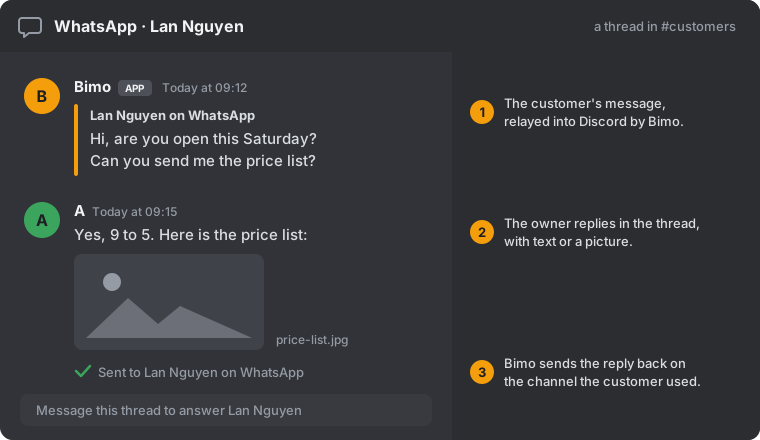
An illustration of one customer's thread, not a final design.
Scope
| In the POC | Not in the POC |
|---|---|
| Sign-up, connectors and the prompt on the website | Web pages on the customer side or owner side (the MVP) |
| An app created by default, with its own web address | Any template other than the message bridge |
| WhatsApp Business, Telegram bot and Discord connectors | Viewing, exporting or deleting app data in Bimo |
| Customer messages forwarded to Discord, one thread per customer | Zalo, Slack, Drive and other connectors |
| The owner's replies, including pictures, sent back | The AI answering customers or finding files by itself |
| The bridge built from its template by one prompt | The AI adding arbitrary features; rules the owner edits |
MVP
An owner gets an app with web pages at its own address, {app}.heybimo.app, built from a template, and can see and export its data in Bimo.
Decisions made
| Topic | Decision | Reason |
|---|---|---|
| First rule | Easy for a non-technical owner comes before power, flexibility and cost | The owner is our user; what they cannot do alone, they will not do |
| Shape of an app | Every app has a customer side, a backend and an owner side | One model covers many kinds of business, so templates are shared |
| Managed by Bimo | An app and its data are run by Bimo and changed only through Bimo | The owner cannot operate them, and one path for changes keeps apps safe to update |
| Leaving Bimo | Our goal: an owner who stops using Bimo can take their app and its data and keep the app running without us. Hard to do, so we build towards it from the start. The hand-over must be easy too: ideally the owner does it alone, step by step in Bimo; if they want help, they pay for a support person to walk them through it. Exporting the data is always free | "Own it" has to be true; an owner who cannot leave does not own the app |
| Templates | Every app starts from a template the Bimo team has built and tested | The owner cannot fix a broken app, so the starting point has to work already |
| Stages | POC with one template and Discord as the owner side, then the MVP with web pages | Discord proves the idea before we build app pages |
| App by default | Every owner gets an app from the start, even if it is empty | The POC uses the same structure the later stages build on |
| How apps are built | Bimo's AI builds a separate app for each owner, not one shared app with settings | No ceiling on what an app can become |
| POC build | The AI adapts the message bridge template; it does not start from nothing | A badly built bridge loses customer messages |
| Chatting with the agent | Only on Bimo's website | One place to give instructions |
| AI auto-reply | Off in the POC; later it depends on what the owner wants | Keeps the first release safe |
| AI permissions | The owner will be able to edit rules on what the AI may do | The AI can act on all their connectors, so they set the limits |
| Web addresses | Bimo is at heybimo.ai. Each app gets its own address, {app}.heybimo.app; an owner can have several | The brand lives on .ai; each app stands alone |
For the message bridge template
| Topic | Decision | Reason |
|---|---|---|
| WhatsApp number | The owner's own WhatsApp Business number | Customers keep writing to the number they know |
| Pictures | The owner drops the picture into Discord and Bimo relays it | The bridge must be reliable before the AI acts for the owner |
| Discord layout | One thread per customer, labelled with channel and name | Keeps conversations apart and makes replying obvious |
Risks
| Risk | Why it matters | How we limit it |
|---|---|---|
| General too early | Templates built for imagined owners cost time and may fit no one | Build each template with a real owner; the examples above stay examples |
| A badly built app | A wrong build can lose or misdirect customer messages, and the owner cannot fix it | Start from a tested template; check each app before it goes live |
| Many diverging apps | Every owner's app differs, so fixes and improvements multiply | Keep early apps close to their template |
| Owner data in our hands | Bimo keeps each owner's customer data | Each owner's data kept separate; backups; the owner can export and delete |
| Leaving stays a promise only | Apps depend on Bimo to stay online and to reach the owner's channels, so leaving may not work in practice | Design for leaving from the start; try a real hand-over before promising it |
| Connected accounts | Bimo holds the access to the owner's customer channels | Treat that access as the most sensitive thing we hold |
| WhatsApp API onboarding | If an owner uses the phone app, they must move to the API before the bridge works | Ask A now; make onboarding a guided step in connector setup |
| WhatsApp reply window | WhatsApp limits free-form replies to 24 hours after the customer's last message | Show the owner when the window has closed |